Dell Precision M4800
This page describes how to run coreboot on the Dell Precision M4800.
The Dell Precision M4800 is a mobile workstation for Intel’s fourth gen Haswell CPUs with a total of four SO-DIMM slots for up to 32GB of DDR3 RAM (16GB for dual-core CPUs) and a MXM type-A slot for discrete GPUs. The EC is the SMSC MEC5055 which seems to be compatible with the MEC5035 code. This port allows booting with any MXM GPUs, including GPUs this board does not boot on vendor firmware. For NVIDIA on Windows, additional driver spoofing may be required.
Required proprietary blobs
The following blobs are required for coreboot on the M4800:
Intel ME firmware
(mrc.bin)
If you don’t want to use the Haswell Native Ram Init (NRI), you need the Memory reference code in mrc.bin which is used to initialize the Haswell platform and required for a working coreboot image. Please see mrc.bin for instructions on retrieving and using it.
Programming
Flashing internally is possible with Nicholas Chin’s Dell-Flash-Unlock tool. For instructions, see https://github.com/nic3-14159/dell-flash-unlock. To flash with an external programmer, you need to fully disassemble the laptop and remove the motherboard to get access to the flash chips that are located on its underside.
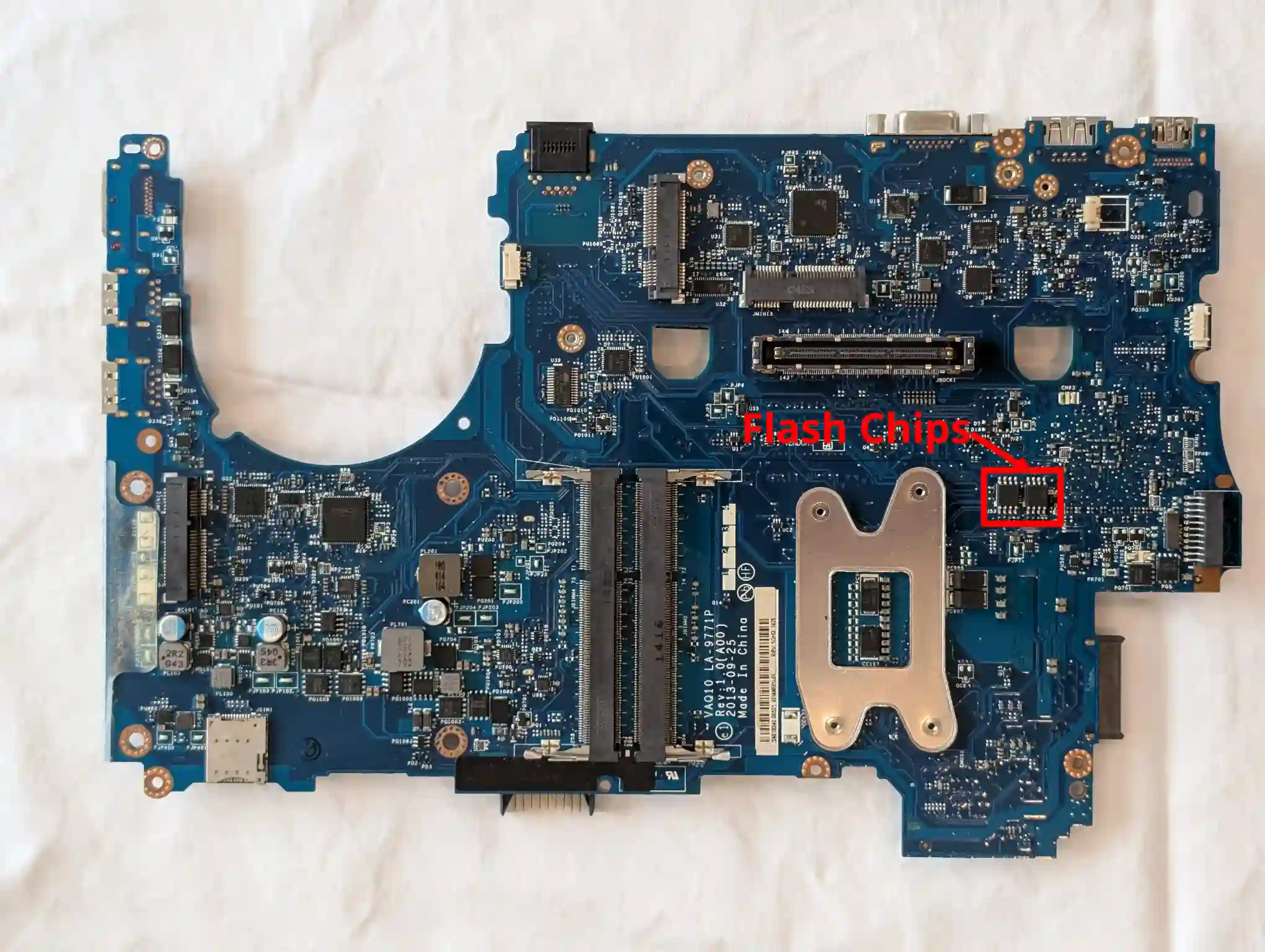
Once coreboot has been initially deployed, it is possible to update internally using either Flashrom or UEFI capsule updates.
Debugging
The board can be debugged with EHCI debug. The EHCI debug ports are at the rear-most port on right side and the front-most port on left side.
Test status
Working:
Haswell CPUs (tested with Intel i7-4800MQ)
All four SO-DIMM slots (tested with 4x Elpida EBJ81UG8EFU0-GN-F 8GB SO-DIMMs)
Keyboard/Touchpad/Trackpoint
EDK2 payload (MrChromebox’s fork, uefipayload_2608)
dGPU (tested with NVIDIA Quadro K1100M)
SATA SSD in main drive and in optical bay drive
Intel Ethernet GbE NIC
Internal flashing on coreboot with flashrom and UEFI capsule updates
TPM 1.2
S3 Suspend and Resume
All video ports
Speakers
1/2MC (PP) slot (tested with Qualcomm Atheros WiFi card)
WWAN slot (tested with Qualcomm Atheros WiFi card, mSATA drive and Sierra AirPrime DW5570 WWAN card)
Battery reporting
Status LEDs
Lid close event reporting
Not (yet) working:
Audio headphone jack
Fan speed reporting and control
Physical wireless switch
Brightness control hotkeys
Unknown/Untested:
ExpressCard
Micro SD/MMC card reader
Docking station support (tested on a previous version, most likely working)